
In the following section you can find answers to common questions.
In case your question is not listed, please do not hesitate to contact us.

The problem occurs due to a certificate issue. This article tells you how to fix it.
In principle Mountain works with OS X El Capitan.
Some people are reporting a high cpu load or an empty volume list after updating to OS X 10.11.
- These issues are resolved after a reboot of your Mac.
Some people are reporting that the 'Remount USB Storages' command does not work properly.
- We are working on an update that will fix this issue, too.
In case you have migrated to our direct sales version you may disable the news window in the preferences.

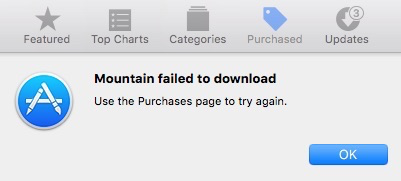
Before you install Mountain from the Mac App Store please make sure that every other Mountain.app bundle is completely removed from your Mac. To do this open the Finder and search for 'Mountain.app' in all file names. Move all Mountain.app bundles in the trash and make sure to empty the trash afterwards. Now you should be able to install Mountain from the Mac App Store.
The current version number as well as a change log of all versions can be found here.
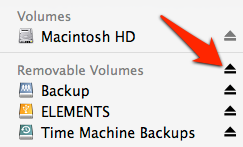
To eject all volumes in a group (e.g. Removable Volumes) click on the symbol next to the group label.
Please follow the migration guide.
Please download Mountain again from the Mac App Store and run it as the different user at least once. Afterwards the direct sales version will run with no limitations. In other words you need to redo the migration for the different user.
(For experts another option is to copy the contend of the folder ~/Library/Application Support/Mountain to the equivalent folder of the different user.)
Please install the Mac App Store version first and run it once. Afterwards the direct sales version will run without limitations. (In general you may follow the migration guide.)
In the dialog window that shows blocking applications, press and hold the option key. Buttons will appear "Force Quit".
Unmounting internal hard drives does not comply with apples sandboxing rules. Please migrate your Mac App Store version to our direct sales version. It will allow you to unmount internal drives.
Please try to enable "Eject whole drive when external media is unmounted" in the advanced preferences.

Please try to enable "Eject whole drive when internal media is unmounted" in the advanced preferences.

Please enable "Detach all unmounted volumes on wake from sleep" in the advanced preferences.

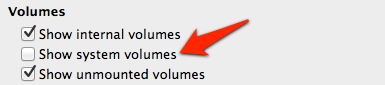
Most likely you have enabled "Show system volumes" in the general preferences.
To uninstall Mountain simply delete the Mountain.app bundle from your /Applications folder.
To uninstall the Mountain helper tool download the Mountain Helper Uninstaller.
In addition Mountain stores its preferences in a .plist file located here: ~/Library/Preferences/de.appgineers.Mountain.plist
Mountain specific data is store in a folder located here: ~/Library/Application\ Support/Mountain
You may also delete the .plist file and the Mountain folder from the Application Support directory.
Please try a SMC reset to solve this issue.